What to add to your AI coach so it can answer from the work you already do
You can have a first version of your AI coach in about 10 minutes. During setup, Coachvox creates its first training data from the information you give it. You can chat with it straight away.
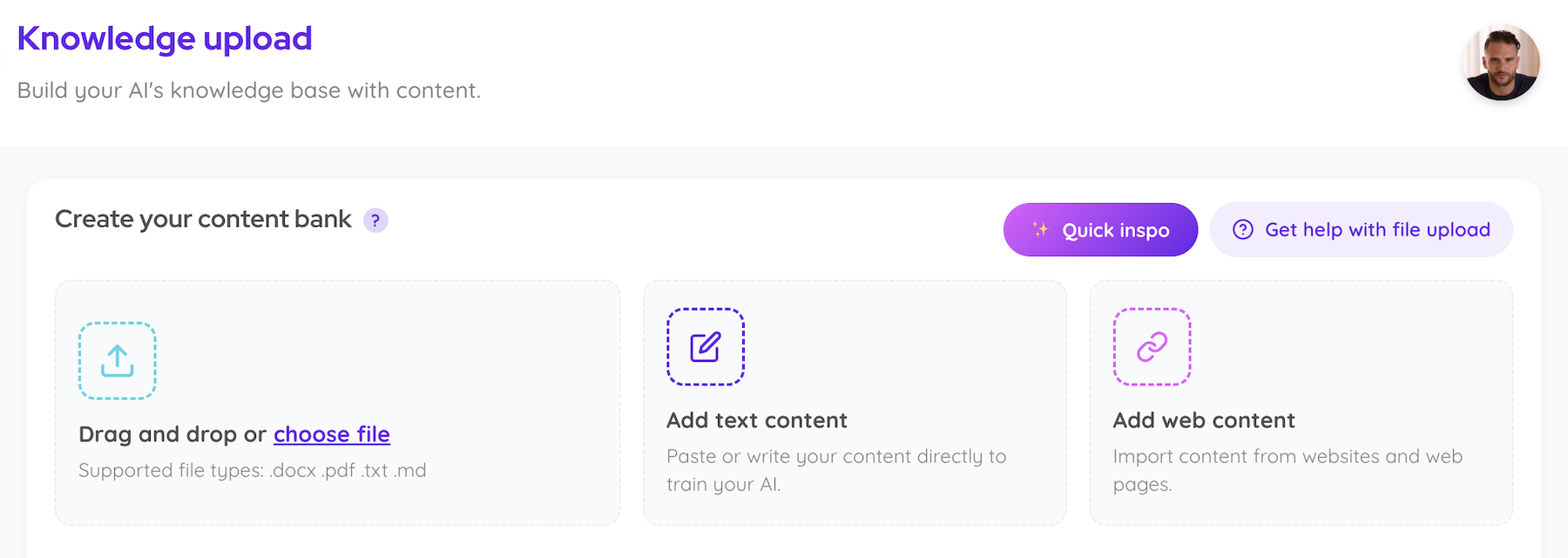
Then give it more of what you know. Drag in articles, course lessons, book chapters or video transcripts, or add a link to a public web page. Coachvox turns that material into training data your AI can use when people ask it questions. You don’t have to rewrite your book as a hundred FAQs. You just need to decide what’s worth adding.
You can train your AI coach on content you’ve already written, taught or recorded. That includes the chapter you spent six months editing and the email you dashed off on a Tuesday. Both can teach your AI something useful.
Blog posts and newsletters explain how you think. A post about why you tell new managers to stop solving every problem for their team gives your AI a point of view it can draw on.
Course lessons and workbooks show how you teach. If a worksheet asks clients to score their confidence, include the lesson that explains what to do with the score.
Books and guides give your AI the detail behind your methods. A chapter with a worked example shows how you apply an idea when the situation is messier than the diagram.
Video and audio transcripts capture explanations you’ve given out loud. A solo video where you talk through a common mistake can be as useful as an article on the same subject.
Answers you’ve already written for clients show how you respond to real questions. An anonymised reply from an email or a group Q&A can capture advice that never made it into your course.
There’s no set order for uploading content. Think about who’ll use your AI and what they’re likely to ask. Then pick something you already have that would help answer one of those questions.
If you’re sharing your AI with prospects, add the article you send when someone asks how your approach works. If it’s for existing clients, add the lesson they keep getting stuck on and the answers you’ve already given them. The follow-up email might be every bit as useful as the lesson itself.
That’s what Rose Radford’s team did. They used answers she’d already written in her client group to train her AI on questions that were taking up her time. Rose estimates it saved her about 12 hours in the first month.
If you wouldn’t give that advice to a client today, leave it out. The same goes for generic information anyone can look up. Your AI doesn’t need a lesson on the capital of France. Give it the advice people come to you for.
Watch out for near-duplicates, too. If you’ve covered the same advice in a blog post, a newsletter and a course lesson, pick the clearest version. Uploading all three can create duplicate question-and-answer pairs without teaching your AI anything new. If the lesson includes a worked example the blog post doesn’t, add that example.
A raw two-person transcript can bury a good answer in a lot of back-and-forth. It can also make someone else’s advice look like yours. Use your transcription tool to label the speakers, then pull out your answers and keep enough of each question for those answers to make sense on their own.
You can ask ChatGPT or Claude to help clean up the transcript. Check that the result still says what you meant, then send the sections you want to use to Coachvox through the MCP connector. For more examples, see how to prepare your content for upload.
Ask your AI a few questions you’ve actually heard from clients. Include the follow-ups. It might explain your framework perfectly, then get stuck when someone says, “I tried the first step and it didn’t work. What now?”
If the reply is close but misses something you’d normally say, edit it in Fine-tuning and save the improved answer as training data. If your AI doesn’t have the material it needs, add the relevant lesson, article or example. If the answer only exists in your head, write it down as you’d explain it to a client, or record yourself and use the transcript.
Then ask the question a different way. If the new reply gives the advice you’d give, move on to the next question. That’s a better use of your time than uploading another ten articles and hoping one does the job.
For the full walkthrough, see how to create an AI coach with Coachvox.
Get a first version of your AI in about 10 minutes. Then give it a question your clients ask all the time and see what it says.
There’s no set amount. Start with enough material to answer the questions people are most likely to ask. Test those questions in Fine-tuning, then add what’s missing. One article that answers a common question is more useful than ten that don’t.
Yes. Use workshop notes, articles or answers you’ve already written for clients. If your best advice usually comes out on calls, record yourself answering a question you hear often and add the transcript.
Yes. You can add new material and update existing answers without rebuilding your AI. Once people start chatting with it, look at what they ask. If a question keeps coming up and your AI doesn’t have a good answer, add the one you’d give yourself.